
10 Services To Send Text Messages From The Web
 Sometimes you need to send a text messager, but you forgot your phone, or you have a poor cell reception. So what can to do? we’ve got some web sites to help you get started with staying in constant contact with your friends, families and even your customers.
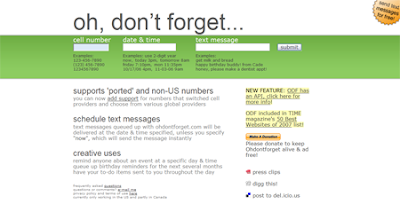
OhDontForget.com - Not only can you text people, you can schedule them for later delivery.
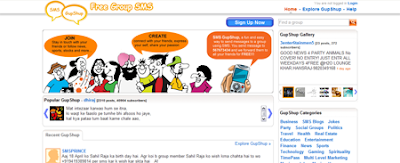
 SMSGupShup.com - A system to allow you to send one text message to a number and they will then resend it out to every member that belongs to your group, up to 5,000 people in size.
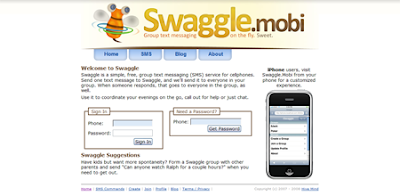
 Swaggle.mobi - A service for small groups to SMS each other at once; accessible via iPhone as well as by the web.
 Yahoo Mobile - Yahoo Mobile lets you send and receive phone text messages; you will not be charged for sending the SMS; but the recipient might be charged the standard messaging rates for receiving or replying.
 Yellowpipe - Mainly a web host, but they happen to offer a quick and easy SMS feature when you just have to get out a text quickly. They do allow you to enter a return number.
 Bloove.com - Get your phone contacts on the Bloove site, and then log in and manage them as well as send them text messages directly from the site.
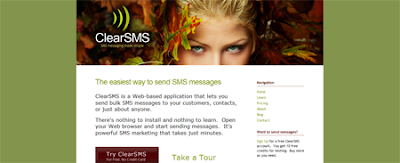
 ClearSMS.com - A professional SMSing service for businesses to send out mass messages to their customers to alert them about specials and sales. All messages are assigned a value in credits an you purchase more as needed.
 GizmoSMS.com - GizmoSMS lets you send texts to users in over 50 countries an a slew of carriers inside each of those. While it is free to use, it does not allow space for identifying yourself except inside the body of the text.
 Group2Call.com - Allows you to import your contacts, break them up into groups and send all the free texts you want to them. Also offers the chance to broadcast voice messages, but you have a limited supply of those.
 Jaxtr.com - This one requires the person you wish to text to have the widget (like the one pictured above) installed on their blog or social networking profile, but if it’s there, you can text the member if they live in one of any 38 countries.
Related: Send SMS Text Messages Via The Web for Free

Labels: SMS
Send SMS Text Messages Via The Web for Free
The Menlo Park, California based company that "links your phone" to the wen, Jaxtr, announced that its members can now send free SMS to mobile phones in 38 countries directly from their Jaxtr home page.

Those not familiar should know Jaxtr allows users to hear from callers worldwide while keeping their existing phone number private. The service works with any phone, including ordinary landline phones and no download is required. Currently, Jaxtr is used by over ten million people in 220 countries.
Commenting on the announcement Jaxtr co-founder and COO Touraj Parang said: "You can SMS your friends and family abroad whether or not they are currently members of jaxtr. The moment you sign up for a free account at jaxtr.com, the world is literally at your fingertips."
Read more...
Those not familiar should know Jaxtr allows users to hear from callers worldwide while keeping their existing phone number private. The service works with any phone, including ordinary landline phones and no download is required. Currently, Jaxtr is used by over ten million people in 220 countries.
Commenting on the announcement Jaxtr co-founder and COO Touraj Parang said: "You can SMS your friends and family abroad whether or not they are currently members of jaxtr. The moment you sign up for a free account at jaxtr.com, the world is literally at your fingertips."
Labels: SMS
Get SMS Event Alerts from Google Calendar
Google calendar supports sending event alerts through SMS, if you have a mobile and Google account. Its very simple and you can setup this within one minute.
Login to calendar.google.com with your Google account user name and password.
And go to the "Settings" link on the top right section of the page.
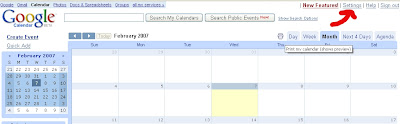
In "Calendar Settings" section click the "Notifications" link.
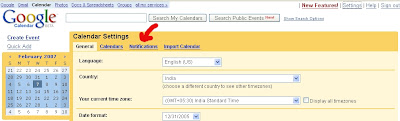
Then you will get the section for specifying your calendar events notification methods.
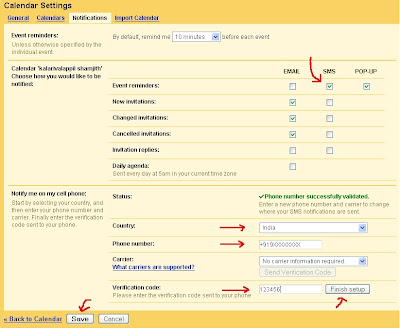
From this page you can:
Hats off to Google.
Read more...
Login to calendar.google.com with your Google account user name and password.
And go to the "Settings" link on the top right section of the page.
In "Calendar Settings" section click the "Notifications" link.
Then you will get the section for specifying your calendar events notification methods.
From this page you can:
- Select the "duration before the event you should be notified".
- Select the mode of reminder "EMAIL" or "SMS" or "POP-UP".
- Select your country and enter your mobile number.
- Click the "Send Verification Code" button.
- Wait for a moment you will receive your verification code in your mobile, and enter the same in the text box provided for verification code.
- Click "Finish Setup" button
- And click "Save" button to save your settings.
Hats off to Google.